# SJAG Events: User Guide
# Introduction
# Introduction
**SJAG Events** - St. John Ambulance Guernsey Events - is the online event duty booking system for St. John Guernsey. Through this site, volunteers are able to book, amend, and delete duty bookings for first aid events around the island.
SJAG Events is currently in the *release candidate* stage of software development. As such, some bugs and errors may still exist on the platform; users are encouraged to report any issues and to be patient as the software evolves and is fully released.
# Roles & Navigating The User Guide
There are four main user types on SJAG Events, this guide is split into sections that are relevant to each type of user.
| User type | Purpose | Section |
| Regular (operational) user | A regular, or operational, user is one who books duties on SJAG Events. | User Pages |
| Youth Team | The Youth Team are responsible for managing cadet bookings and accounts. They must approve all cadet bookings. | Youth Team Pages |
| Event Organiser | The Event Organisers are responsible for adding and maintaining events on the system. They also oversee all duty approvals. | Event Organiser Pages |
| System Admin | System admins are responsible for the management of the system, such as the creation and editing of users, roles, and vehicles. | Admin Pages |
# Cookies & Privacy Policy
**IMPORTANT:** This page contains the privacy and cookie policy you agree to by using SJAG Events. This is displayed on the website on the [About](https://events.stjohn.gg/about) page, and upon your first login you will be prompted to read and agree to the policy. If the policy changes, you will be prompted to agree to it again.
SJAG Events has been designed with your privacy always in mind. As such, this system tries to collect as little data on you as possible. Below is a full explanation of what data we collect, how it is used, stored, and displayed, and the cookies on this website.
**As of January 27th 2026, SJAG Events and all associated data is now hosted on a St. John owned server.**
#### Cookies
When you use SJAG Events, your browser will be set with cookies from two websites:
**https://SJAGE.JamesDev.co.gg**
Cookies set by this website are essential, and are required to allow you to login. Essentially, these cookies allow the website to know you are you, and that you have logged in between pages. Otherwise, you would need to login every time you switched paged.
**https://Analytics.JamesDev.co.gg**
Cookies set by the analytics website allows me (the developer, hello!) to better understand how this website is being used. The data generated by this system is 100% anonymous and cannot be linked to a user on the system. Additionally, because the analytics system I use is hosted on my servers, as opposed to other options such as Google and Facebook, the data generated from this cannot be used to track your activity on other website, and is not used to target adverts to you.
*Analytics is no longer collected, some metrics, however, are still logged for the purposes of system monitoring.*
#### Data collection and usage
For the operation of this website, the the following personal data is collected:
- Your email address
- Your first name
- Your last name
Your first and last name is visible only to other logged in users on the system. For regular users, your email address is only visible to admins, your event organiser (Phil Ozanne), and the youth team if you are a cadet. If you are an event organiser, your email address is visible to logged in users in order to contact you regarding an event.
SJAG Events falls under the main St. John Charity Guernsey privacy policy, details of which can be found at [www.stjohn.gg/privacy-policy](https://stjohn.gg/privacy-policy).
# Cookies & Privacy Policy V2
**IMPORTANT:** This page contains the privacy and cookie policy you agree to by using SJAG Events. This is displayed on the website on the [About](https://sjage.jamesdev.co.gg/about) page, and upon your first login you will be prompted to read and agree to the policy. If the policy changes, you will be prompted to agree to it again.
SJAG Events has been designed with your privacy always in mind. As such, this system tries to collect as little data on you as possible. Below is a full explanation of what data we collect, how it is used, stored, and displayed, and the cookies on this website.
**Last**** revision: 16/01/2025**
#### Who can use SJAG Events?
#### What data is collected and how is it used?
SJAG Events directly collects the following datapoints from you, these are essential to system operations.
- **Your full name**
- Used to identify you and is displayed to all authenticated users
- **Your email address**
- Used to identify you at login
- Used by SJAG Events to send you notifications
- Is displayed to Event Organisers to contact you regarding your duty
- Is displayed to Admins and can be used to contact you regarding your account & system related matters
- If you are an Event Organiser, your email is available to users on events you have been added to as an organiser
- If you are a Cadet, your email is visible to Youth Team users
- **Duties you have signed up for**
- **Your parent or guardian's email *(Cadets only)***
- Used by the system to include your parents or guardians in all emails which are sent to you by SJAG Events
- **Your IP address**
- Recorded in server-level logging, can only be viewed by direct server access
#### Cookies
When you use SJAG Events, your browser will be set with cookies from two websites:
**https://SJAGE.JamesDev.co.gg**
Cookies set by this website are essential, and are required to allow you to login. Essentially, these cookies allow the website to know you are you, and that you have logged in between pages. Otherwise, you would need to login every time you switched paged.
**https://Analytics.JamesDev.co.gg**
Cookies set by the analytics website allows me (the developer, hello!) to better understand how this website is being used. The data generated by this system is 100% anonymous and cannot be linked to a user on the system. Additionally, because the analytics system I use is hosted on my servers, as opposed to other options such as Google and Facebook, the data generated from this cannot be used to track your activity on other website, and is not used to target adverts to you.
#### Data collection and usage
For the operation of this website, the the following personal data is collected:
- Your email address
- Your first name
- Your last name
Your first and last name is visible only to other logged in users on the system. For regular users, your email address is only visible to admins, your event organiser (Phil Ozanne), and the youth team if you are a cadet. If you are an event organiser, your email address is visible to logged in users in order to contact you regarding an event.
SJAG Events falls under the main St. John Charity Guernsey privacy policy, details of which can be found at [www.stjohn.gg/privacy-policy](https://stjohn.gg/privacy-policy).
# Signing Up
Getting onto SJAG Events is quick and easy through the user self-enrol page.
#### **1. Go to the use self-enrol page**
On a mobile or computer, go to [events.stjohn.gg/enrol](https://events.stjohn.gg/enrol), read the disclaimer on the first page and then click 'I Understand'.
#### **2. Fill out your user details**
Enter your name and email address, then set a password. Make sure your password is secure and memorable is as you will need it to access your account once confirmed. The use of complex, auto-generated passwords is recommended.
The security of SJAG Events is heavily dependent on the security of the account password. **Do not use simple, short, common passwords, or passwords you have already used on another site.** Where possible, make use of password managers that can generate complex passwords and save them for you.
#### **3. Select your roles**
From the list, check the box next to the roles you hold within St. John.
**CADETS: along with their main role (e.g. Cadet First Aider), Cadets should also assign themselves the base Cadet role. This can be used for non-operational events that require Cadets, as well as helping the system recognise the user as a Cadet.**
#### **4. Submit & confirm your email**
Complete the hCAPTCHA test at the bottom of the page, then submit your details. You will shortly receive an email from the system to the address on your application - make sure to check your spam folder. Click on the link or copy it into your browser to confirm your email address. If you have not received a confirmation email, please reach out to your system administrator.
#### **5. Wait for your application to be confirmed**
And that's it! Your application has been received and will shortly be reviewed by a system administrator. If your application is confirmed, you will receive an email with instructions on how to login using the credentials you set earlier.
# Types of duty bookings
On SJAG Events, users can create bookings for duties in two different ways. While both types of bookings translate to the same final result - a volunteer on duty - each booking type has its own purpose and is designed to be used in different ways.
#### **What are the types of bookings?**
The two types of bookings are **requirement bookings** and **reserve bookings**.
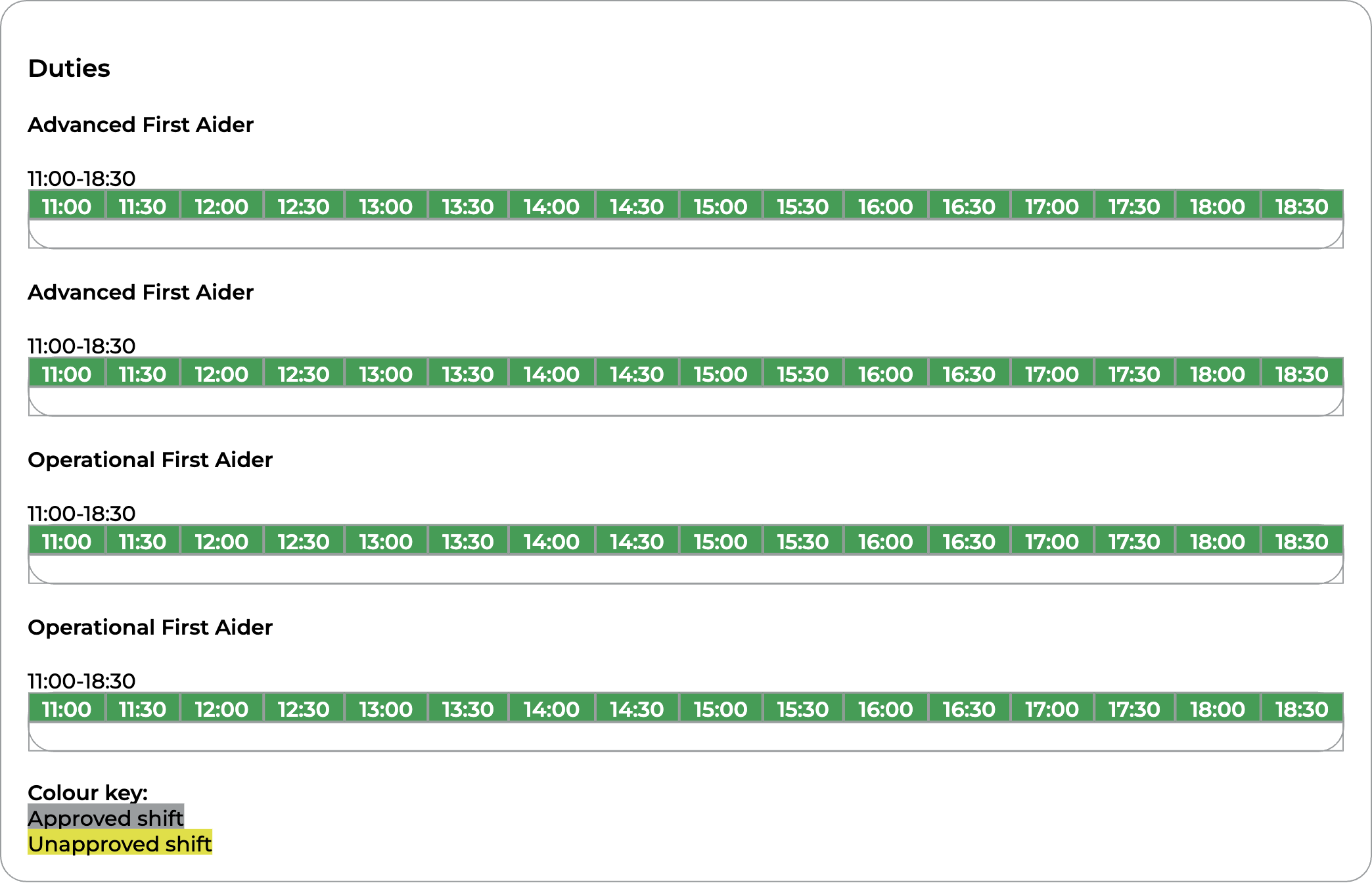
**Requirement bookings** are found on the 'Duties' section of the event page. Requirements are based off of what the event organiser deems is required for an event, the organiser will set the role required and the times, only users with the matching role will be able to create a booking. For longer events, volunteers are of course not expected to stay on for the whole duration, and the system reflect this. Within one requirement, multiple users are able to book on. For events which call for more than one person of that role, multiple requirements will be displayed.
| [](https://docs.jamesdev.co.gg/uploads/images/gallery/2024-09/screenshot.png) |
| For this event, the cover is 2x FA & 2x AFA, and as such four requirements are displayed. |
**Reserve bookings** are found in the 'Reserves' section of the event page. Unlike requirement bookings, the roles and times are not set by the event organiser. Instead, it is up to the user to propose a duty for the organiser to accept. The organiser in turn is then able to either accept, deny, or modify the users bookings. If they choose to modify the booking, the user will then be prompted to themselves accept, deny, or modify - this continues until both party confirm to a booking. Reserve bookings are intended to be used when a user is unable to book on as a requirement booking, for instance if there is already sufficient cover, or if they do not have a required role (such as an Observer, BFA or Nurse who would not be accounted for in the minimum event cover). Reserve bookings are also used by cadets.
| [](https://docs.jamesdev.co.gg/uploads/images/gallery/2024-09/screenshot-1.png) |
| For this event, the user has booked on as an OFA. This duty is shown as pending, meaning that either the event organiser or user needs to accept it - clicking on the row would reveal more information. |
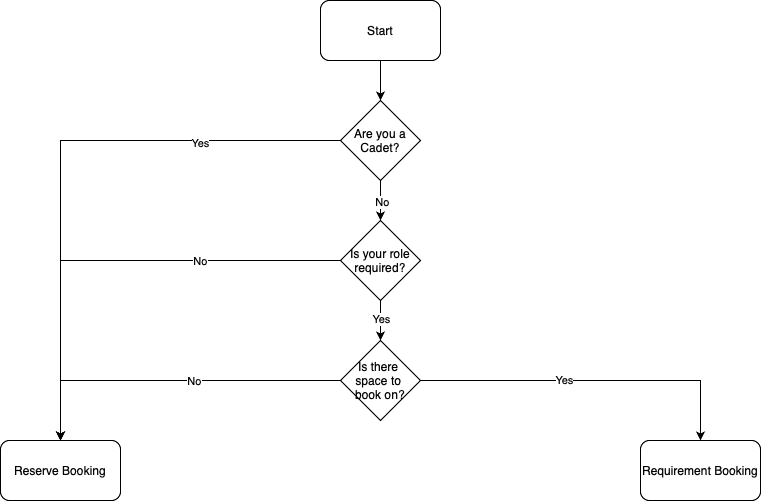
#### **What should I book on as?**
Follow this flow guide to determine what type of booking you should place.
# Update Log
**SJAG Events is updated frequently.** A banner is displayed on the page following an update to explain what has changed.
| **Version** | **Commit ref.** | **Date** | Summary |
| **0.25.9** | e078e29a9b
| 23/09/2025 | Release to SJG Production server |
| 0.25.5 | c0610b3c62
| 22/05/2025 | Improve enrol page UI |
| 0.25.5 | d355ad6691
| 20/05/2025 | Removed Matomo analytics for logging. Youth team can now lock Cadet accounts. |
| 0.25.4.1 | baa6fc0d7c
| 06/05/2025 | Background improvements to system monitoring through Prometheus & Grafana. |
| 0.25.4 | 8bf0be4914 | 15/04/2025 | Changes
- Improved email template - now compatible with the Apple Email app
- Event Organisers are now only notified of new cadet duties once they have been approved
- Event Organiser Excel add in released
|
| 0.25.3.3 | 57a8c514d7 | 01/04/2025 | **Bugfix**: Role change on reserve duties not creating Cadet Booking records, causing 500 error
|
| 0.25.3.2 | bdda930d5d | 11/03/2025 | Improved Cronicle error handling and added details to resere booking change emails to event organisers |
| 0.25.3 | 177d6bf7fe | 01/03/2025 | Account lock fix - build number on UI |
| 0.25.2 | bec56fe074 | 21/02/2025 | System message configuration, youth team can see all Cadet events, not just booked. |
| 0.25.1 | 190a9b9b79 | 20/01/2025 | Hotfix realting to email & notification links, and enrolment page. |
| 0.25.0 | eb112c4791 | 15/01/2025 | System Ops page created - DB backups through web UI |
| *changes before 0.25.0 were not logged*
|
# User Pages
# The home page & side bar
| [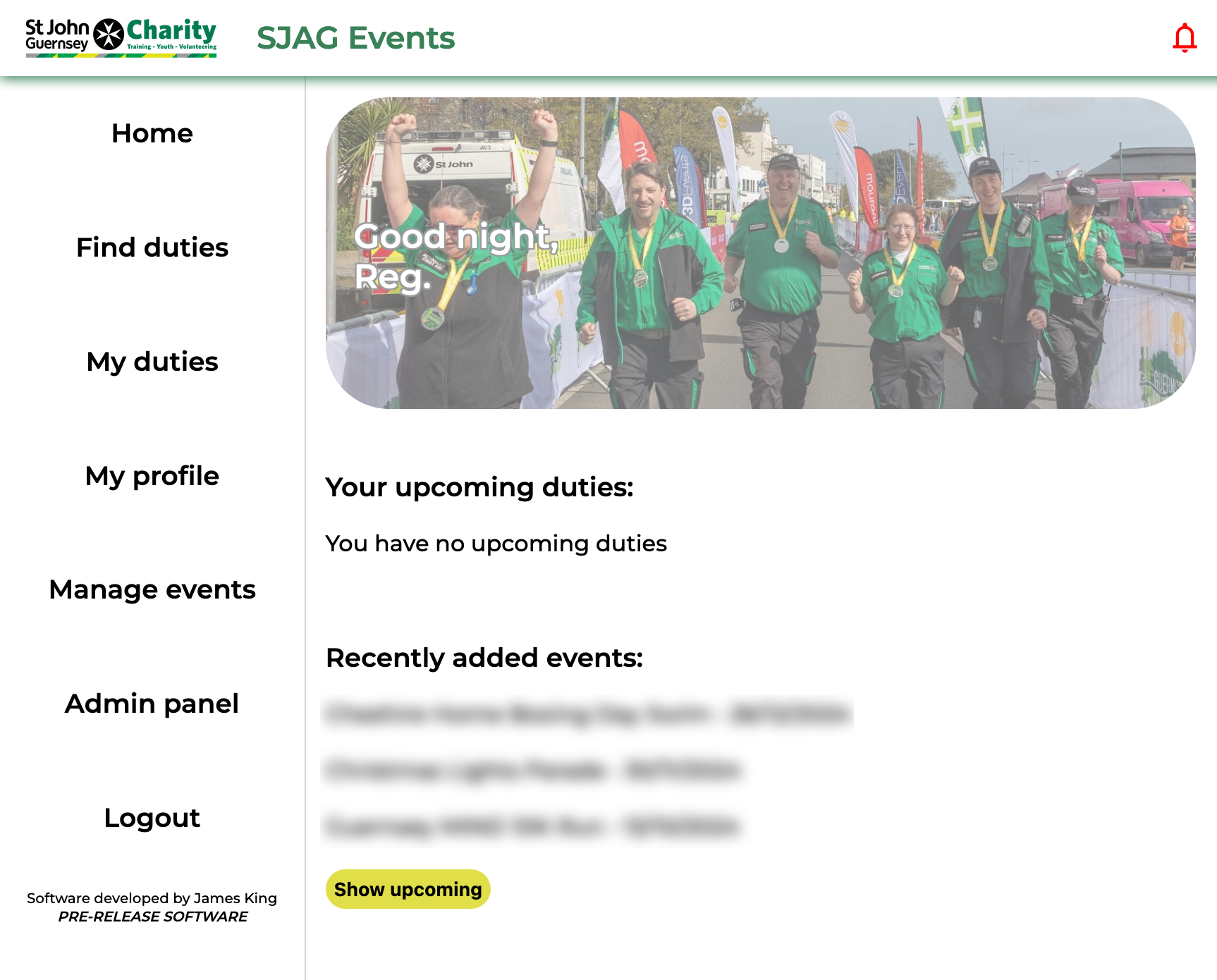](https://docs.jamesdev.co.gg/uploads/images/gallery/2024-09/homepage.png) | SJAG Events is primarily navigated using the left side bar, this contains links to the major actions of the website. The contents of your side bar will differ slightly, depending on what system roles you have. Clicking on any of the buttons will take you to the associated page. Clicking on the lowermost button, below login, will show the 'about' page.
On the homepage, your closest duties will be displayed. Additionally, you can also see events that have been recently added to SJAG Events, and upcoming events.
The bell in the top bar opens your notification inbox. When you have unread notifications, the bell is read, when your inbox is clear, it is green.
|
# My notifications
SJAG Events notifies you whenever an action affecting your account, your duties, or events you are on, and more depending on your system roles. These messages are delivered in three ways:
- **The system notification (My notifications) page** found by clicking the bell icon in the top bar.
- **Email notifications** delivered automatically to the email address assigned to your account.
- **Push notifications \[BETA\] ** once permission has been given, are delivered directly to your mobile device (when saved on the home screen) or desktop browser.
To enable push notifications, follow the instructions in [*My profile*](https://docs.jamesdev.co.gg/books/sjag-events-user-guide/page/my-profile "My profile")
Both email and push notifications contain a link to the notification on the system notification page, which serves as the main store of all of your notifications.
| [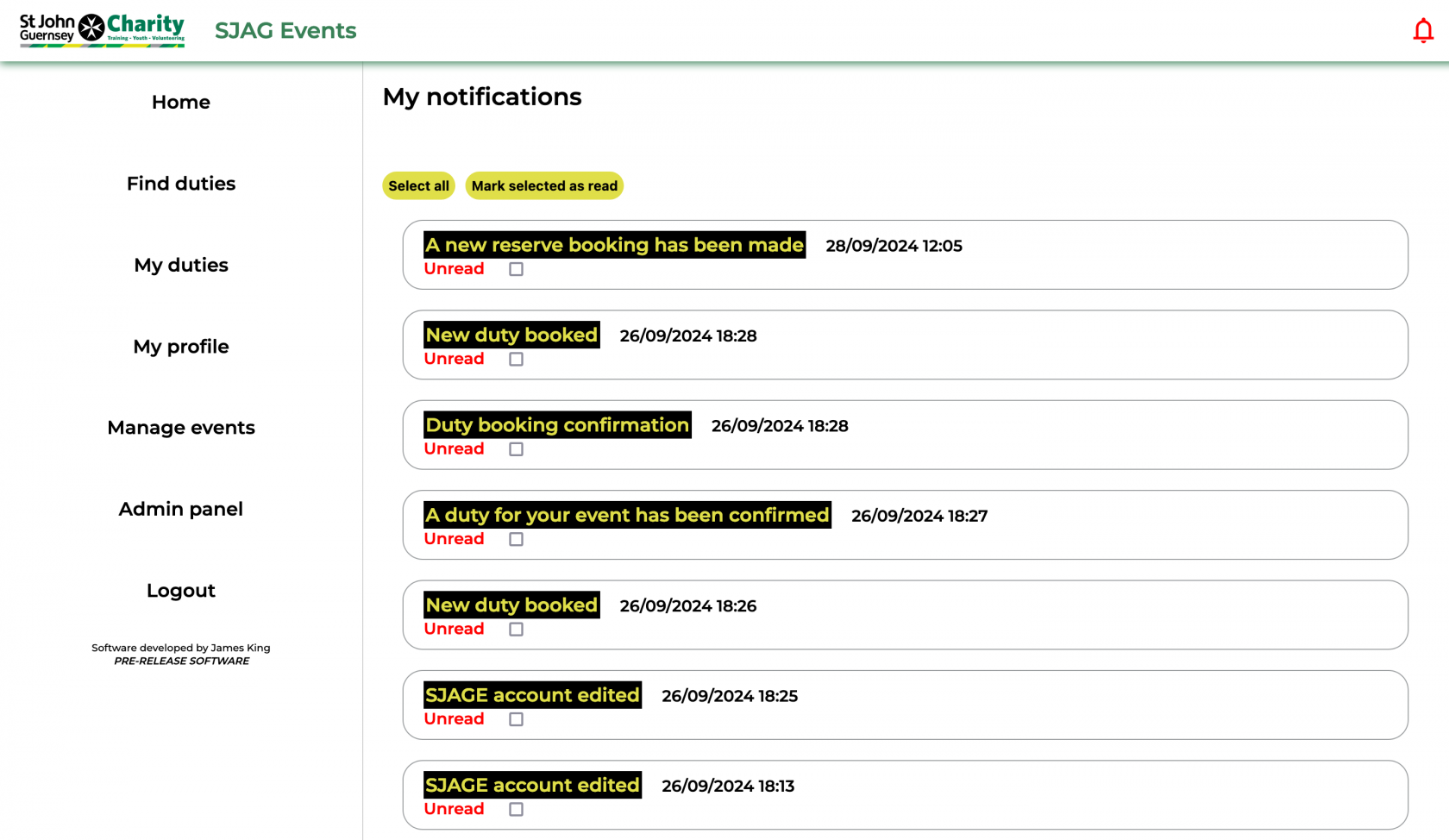](https://docs.jamesdev.co.gg/uploads/images/gallery/2024-09/notifications.png) | All of your notifications are shown as info bubbles, with the most recent at the top. Clicking on the info bubble will open up that notification. A red message indicated that you have not yet opened that notification on the system, and a checkbox will be shown for selection.
You can select unread messages manually, or by using the select all button at the top of the page, to mark them as read by clicking the 'Mark selected as read' button.
|
| [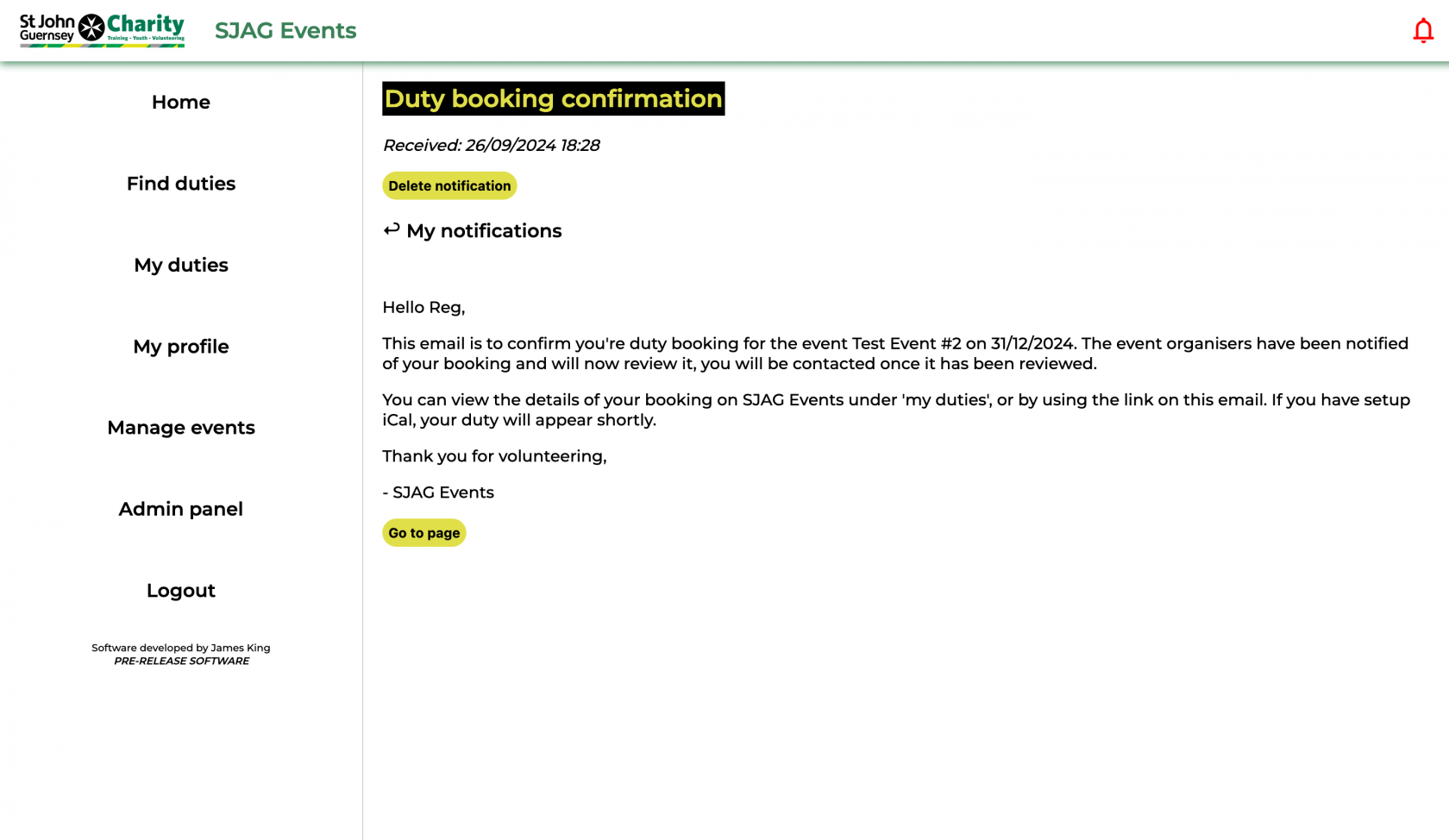](https://docs.jamesdev.co.gg/uploads/images/gallery/2024-09/notification.png) | The notification is displayed on the page, clicking the back button will return you to the 'My notifications' page. Clicking 'Delete notification' will permanently delete that notification from the system.
On some emails, clicking 'Go to page' will take you directly to the related page on the site.
|
# My profile
| *[](https://docs.jamesdev.co.gg/uploads/images/gallery/2024-09/myprofile.png)*
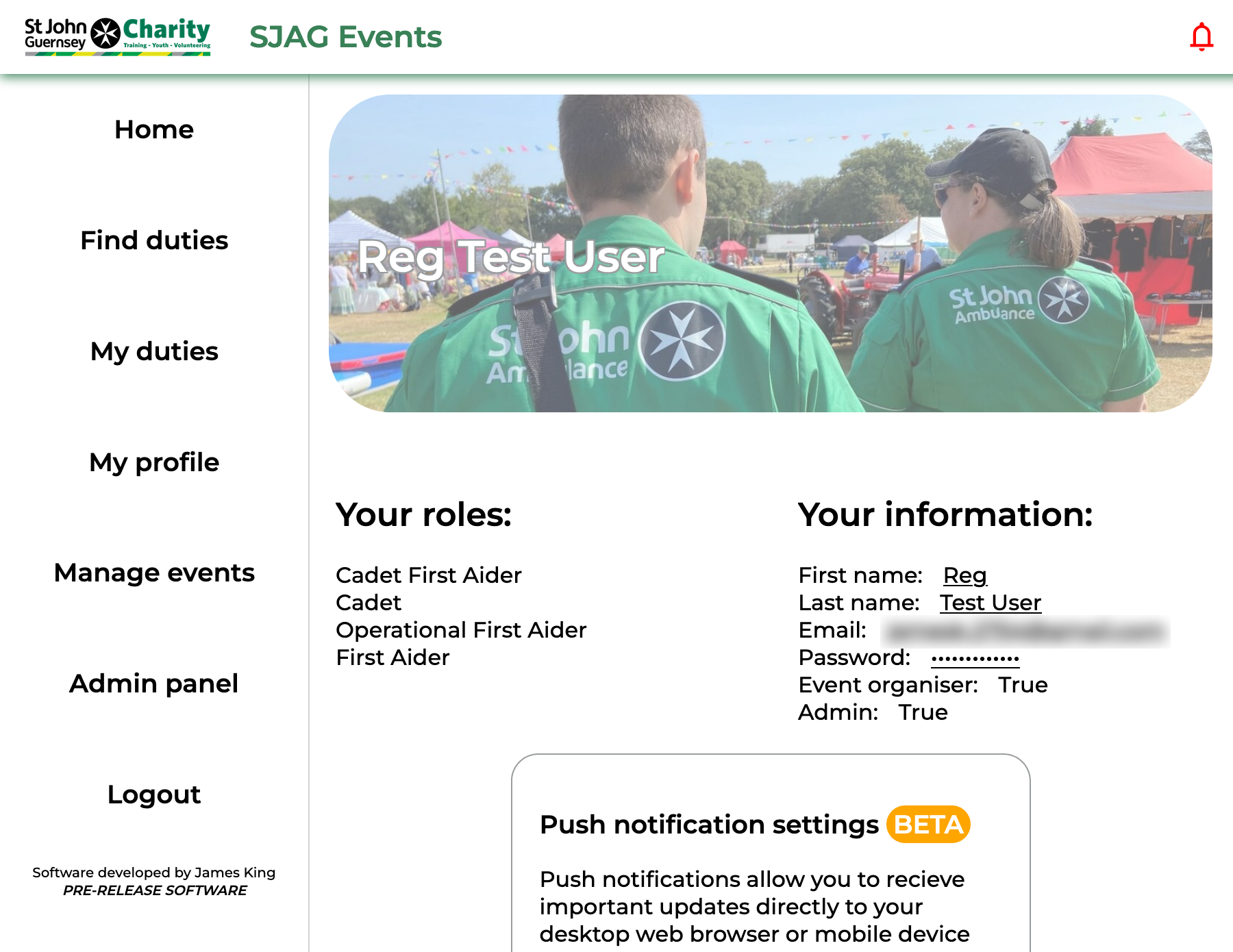
| The 'My profile' page allows you to edit your user information stored on the system. Click the links on the right side of the page to change your name, email, and password.
|
| *[](https://docs.jamesdev.co.gg/uploads/images/gallery/2024-09/pushcontrol-v1.png)* | **Push notifications** **\[BETA\]**
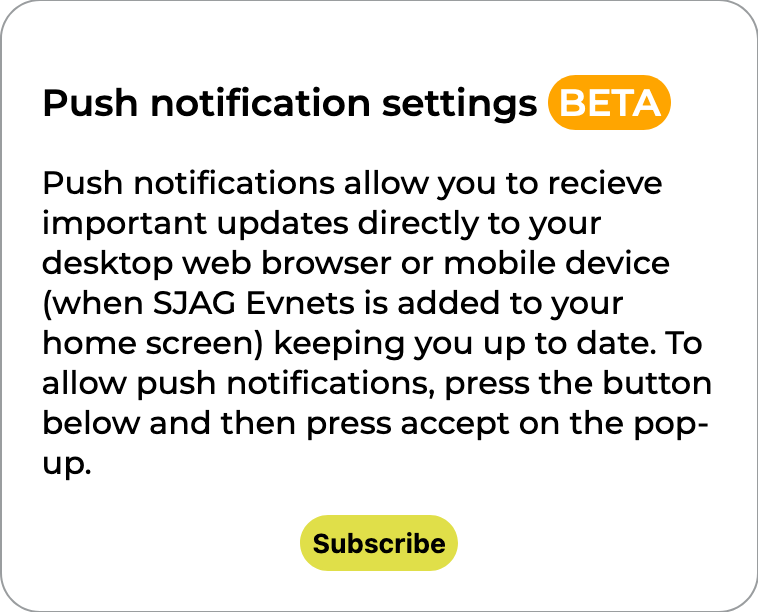
Push notifications allows SJAG Events to deliver important updates to you directly, instead of through your email inbox, when the site is used on a desktop web browser or is added to the home screen on mobile. Navigate to the 'My profile' page and click the 'Subscribe' button, you may see another prompt after this confirming that you would like to receive push notifications.
**Note:** push notifications are an experimental feature and can be unreliable - especially on iOS. Check your inbox frequently or the notification page on SJAG events for up-to-date messages.
|
# iCalendar feature
SJAG Events supports the iCalendar protocol, allowing the system to communicate with the calendar on your phone, tablet, smartwatch, computer, and more. Through this, duties you make on SJAG Events will be automatically populated into your device's calendar, helping to keep your duties organised.
**Note:** iCalendar can take a while to update, depending on your device or app's settings. Please keep this in mind if your duty does not appear or update on your calendar instantly.
| [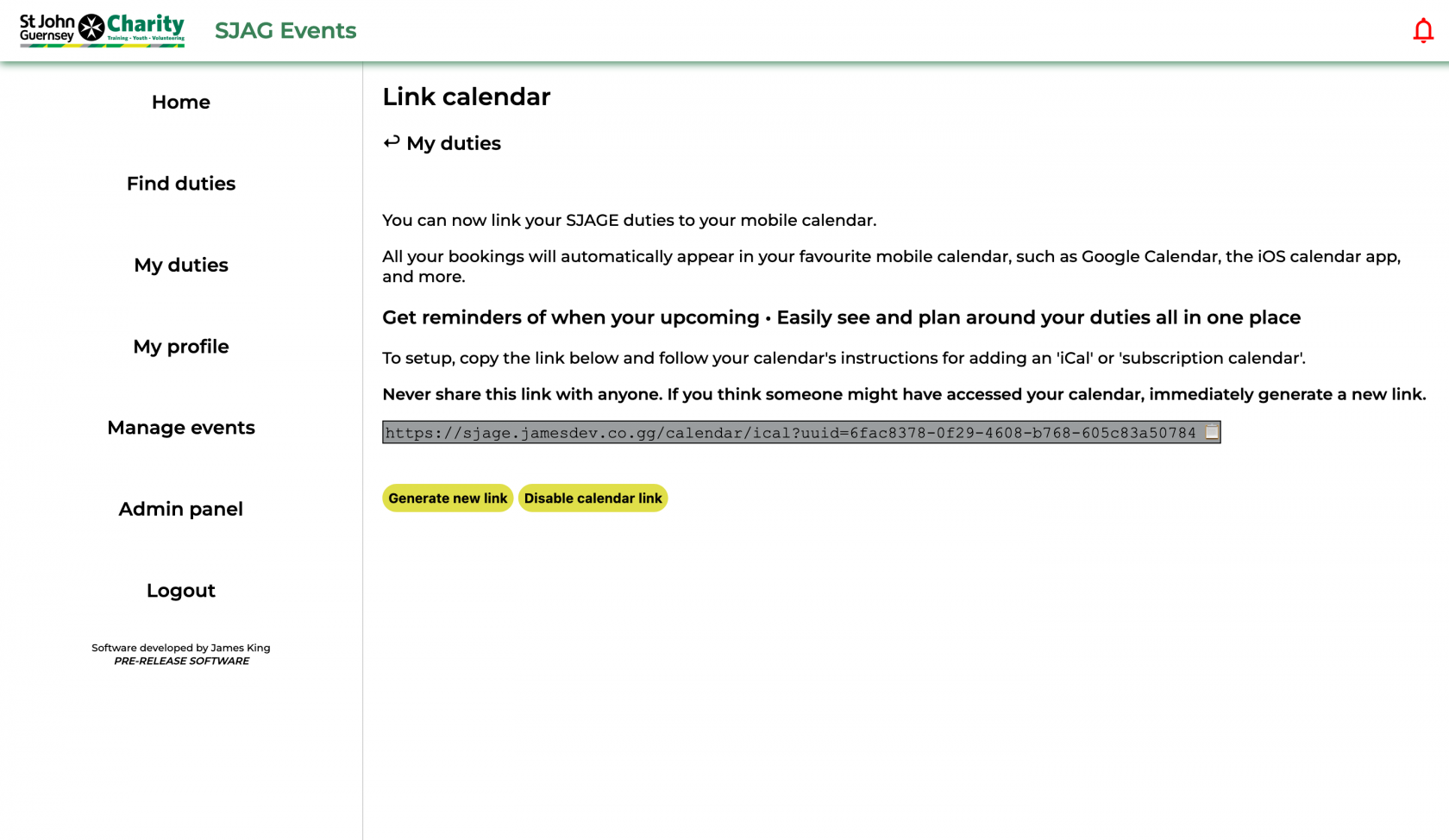](https://docs.jamesdev.co.gg/uploads/images/gallery/2024-09/ical.png) | To enable the iCalendar feature, click 'Generate new link'. You may only have one link at a time, one link may be used across several devices symultenously.
Your unique iCalendar link is displayed in the grey box, this can then be copied into your calendar app by selecting the text and copying it or by clicking on the clipboard emoji at the end to copy.
Setting up your calendar app to accept the iCalendar URL will differ from app to app, but is generally very simple. Attached to this guide are links to articles for the major calendar apps, follow the steps for subscription calendar URLs.
If you wish to stop using the feature, click 'Disable calendar link'. This will instantly deny any future requests to the system. If you wish to reenable iCalendar, you will need to regenerate a new link and enter this into your calendar app.
|
**SECURITY NOTE:** Your iCalendar link is unique to you, with the long string of text at the end being used by the system to identify and authenticate your calendar's request. **Never share this link with anyone.** If you believe someone else has gained access to your calendar link, immediately generate a new link.
# Find duties
| [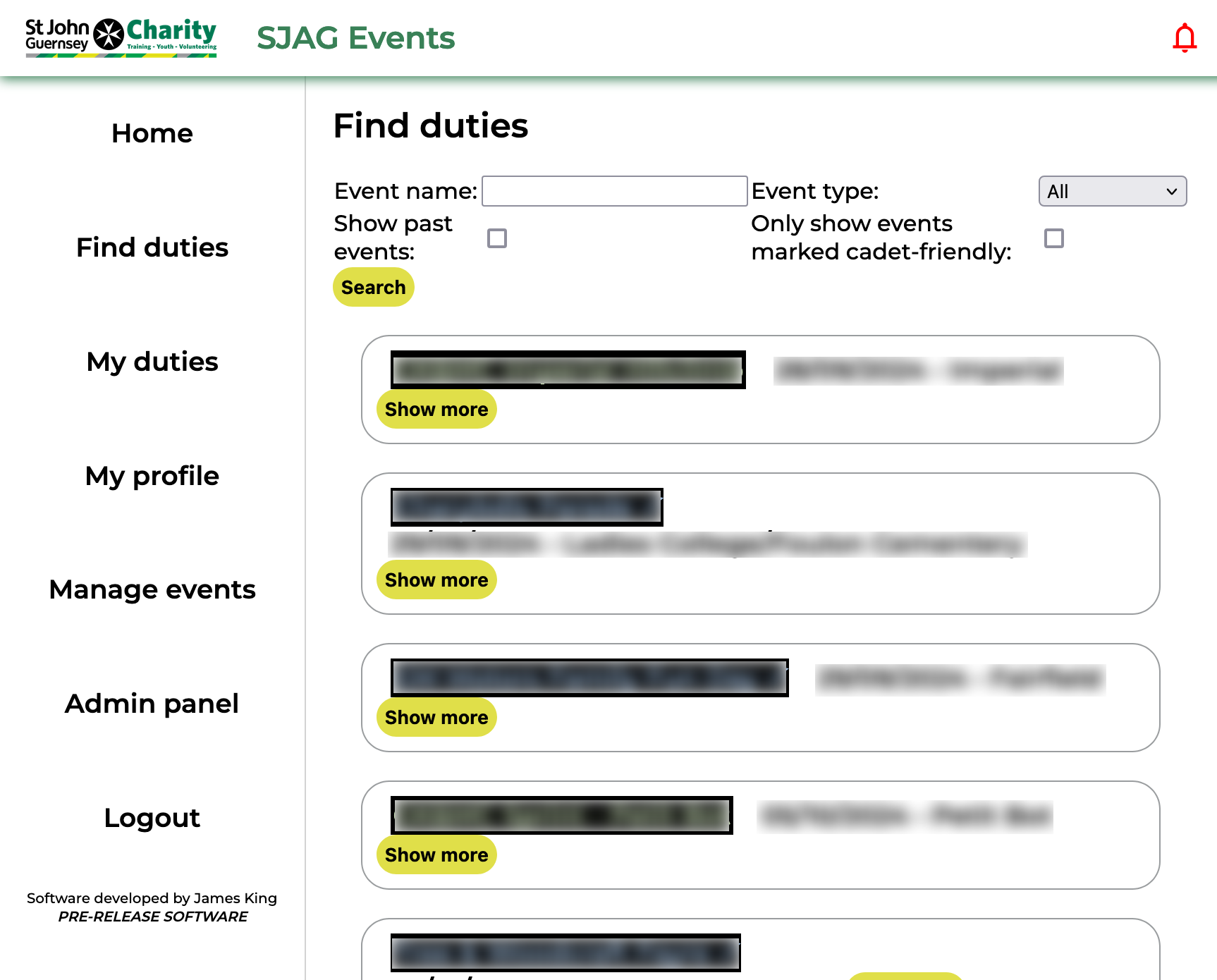](https://docs.jamesdev.co.gg/uploads/images/gallery/2024-09/find-duties.png) | The find duties page displays all available duties on the system. From here, you can search through events to find duties to book onto.
Duty names are colour coded according to the type of event, using the same key as the paper duty lists: SJAG in blue, EAS in green, and joint events in red. Events may also display a check mark in their name; this indicates that the event has been marked as cadet friendly, and that cadets are able to sign up for that duty if they wish.
By default, the page will display all available upcoming duties, however this search scope can be expanded and refined.
- Use the search bar to search for a specific event.
- Adjust what event types will be displayed: SJAG, EAS, and joint events.
- Show previous events by checking the box.
- Show only events which have been marked as 'Cadet friendly' by checking the box.
Each event is displayed in an "info bubble". To prevent overcrowding, these are collapsed by default, only showing basic information. Clicking on the 'Show more' button will expand the bubble to show more information.
|
| [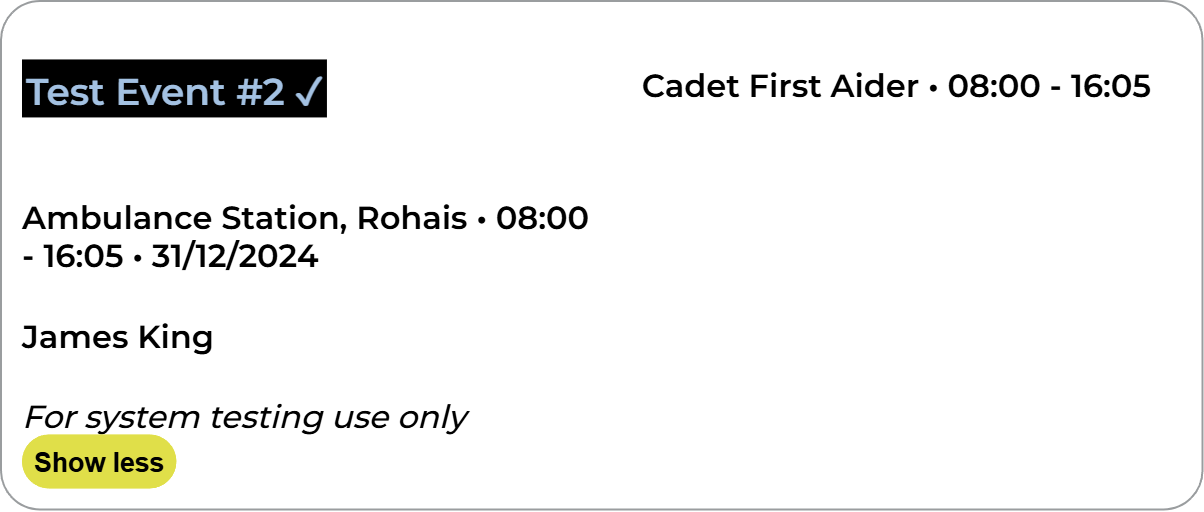](https://docs.jamesdev.co.gg/uploads/images/gallery/2024-09/findevent-infobubble.png) | Clicking anywhere in the bubble will open up the event page, this contains more information on the event and is where you are able to make bookings.
Clicking on the event organiser name will open your default email app on your device, with a new email to the organiser's address.
Clicking on a duty requirement, displayed on the right side of the bubble, will open up that requirement's booking page. From there, you can make a booking for that requirement if you have the correct role.
|
# Event overview
| [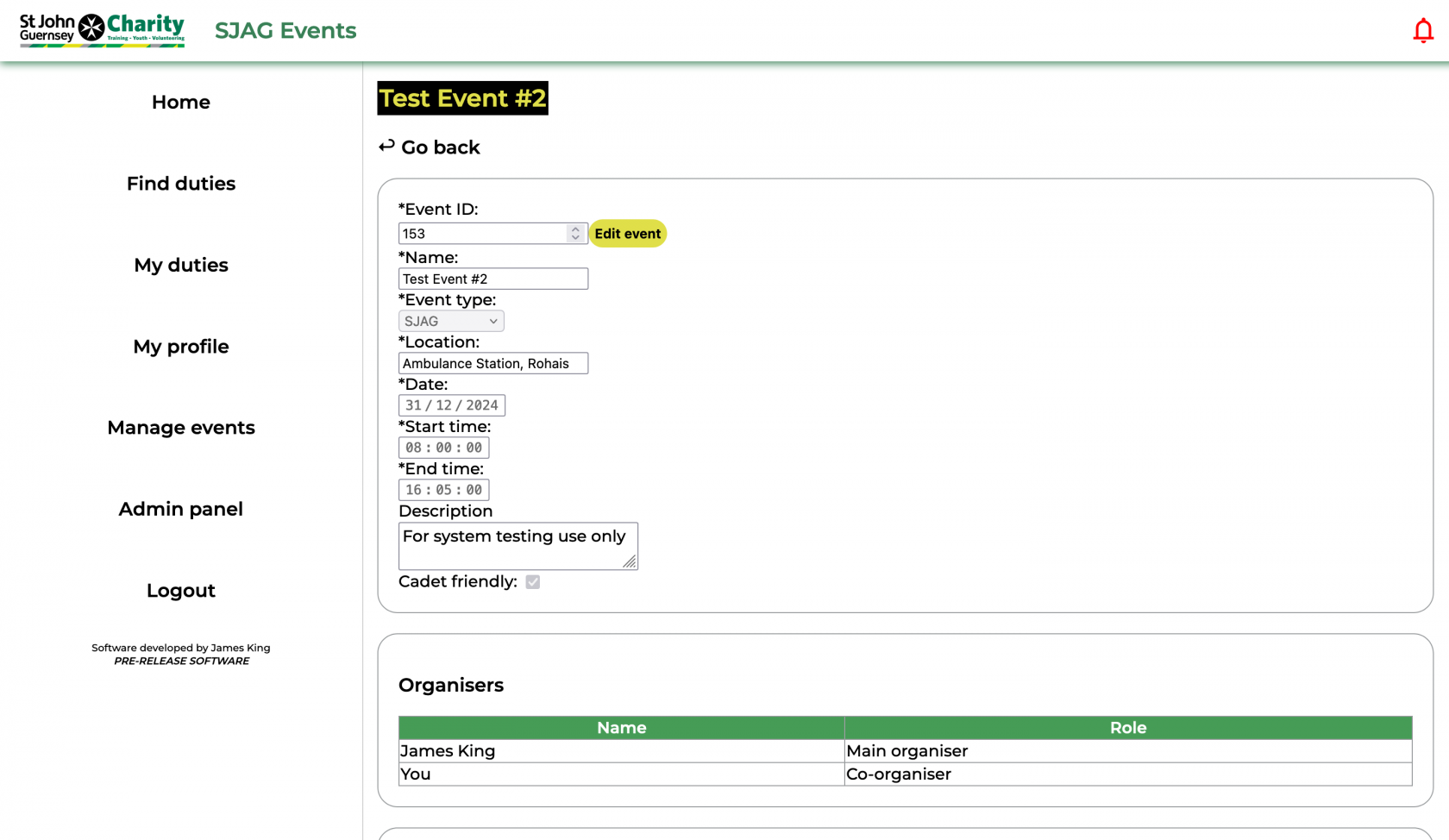](https://docs.jamesdev.co.gg/uploads/images/gallery/2024-09/eventpage-1.png) | The event overview page displays all the information about an event stored on the system.
The first box displays basic information about the event itself, such as the date, posted start and end times, location, and a short description.
The second box lists all the users who have been marked as event organisers for this event. These are the people responsible for the listing of the event on the site and the approval of all duty bookings for it. Click on the user will open your default mail client, with a new email addressed for that user.
|
| [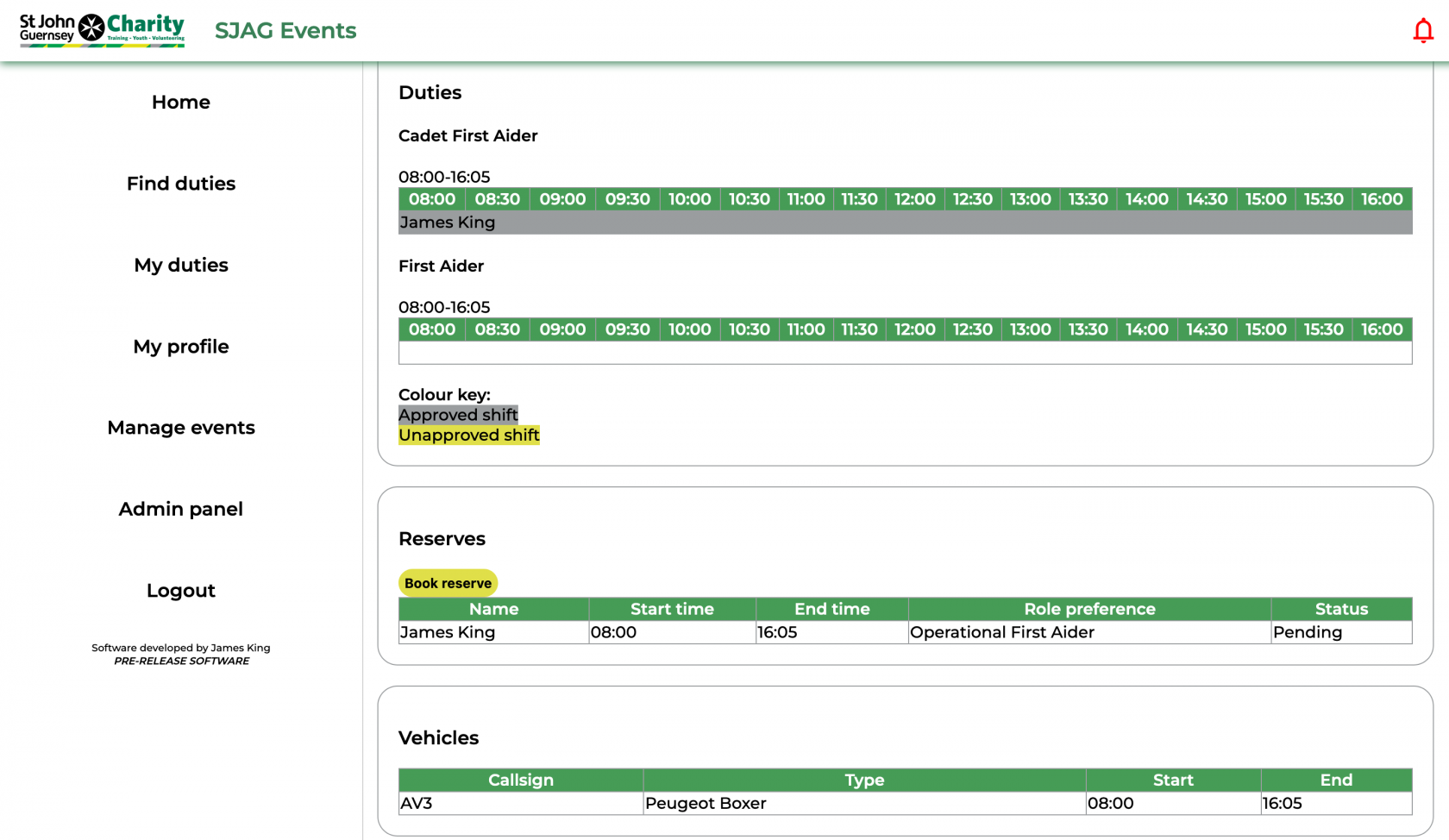](https://docs.jamesdev.co.gg/uploads/images/gallery/2024-09/eventpage-2.png) | The third box shows all the duty requirements for that event, with each requirement having its own timeline. Duties that are booked for that requirement are displayed on the timeline, indicating at a glance what times need to be covered. Bookings that have been approved by an event organiser are displayed on a grey background, and unapproved duties on a yellow background.
Where the user has the correct role to book onto a requirement, a yellow 'Book duty' button will be shown, click this to create a new booking for the duty.
To view or edit a duty you have booked, simply click on the duty in the timeline.
The fourth box displays all the reserve bookings that have been made for that event. To create a new reserve booking, click the 'Book reserve' button. To view or amend an existing reserve booking, click on the row in the table.
The final box shows the vehicles that will be used at the event.
|
# Book duty
| [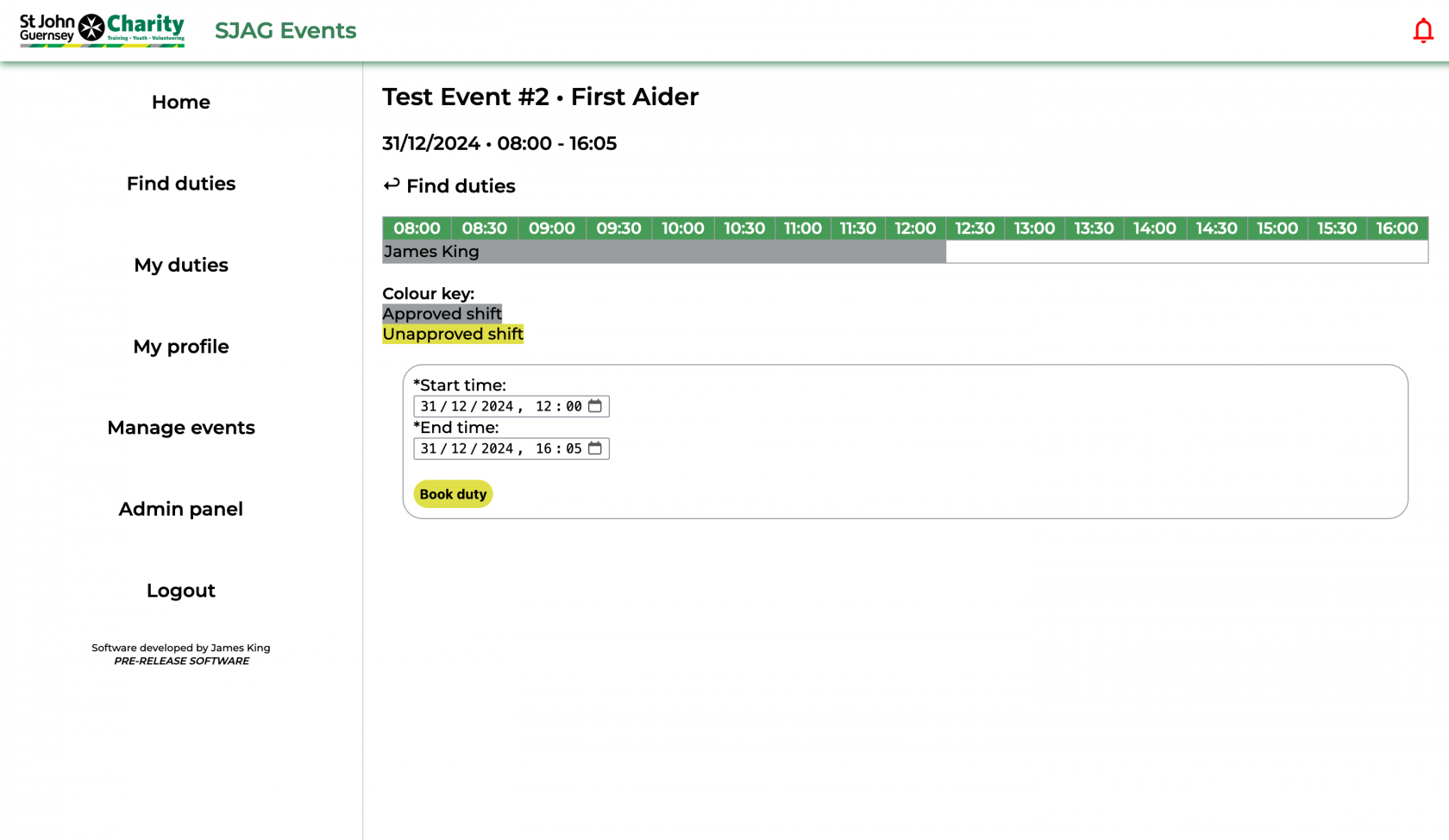](https://docs.jamesdev.co.gg/uploads/images/gallery/2024-09/book-req.png) | To create a new duty booking simply enter your desired start and end times, then press the 'Book duty' button.
Requirement bookings cannot overlap with other bookings on their timeline. Take care, and make sure to review any other duties to ensure that they do not overlap. Vacant slots are shown on the timeline in white, whereas other bookings appear in yellow and grey.
|
# View & edit duty
| [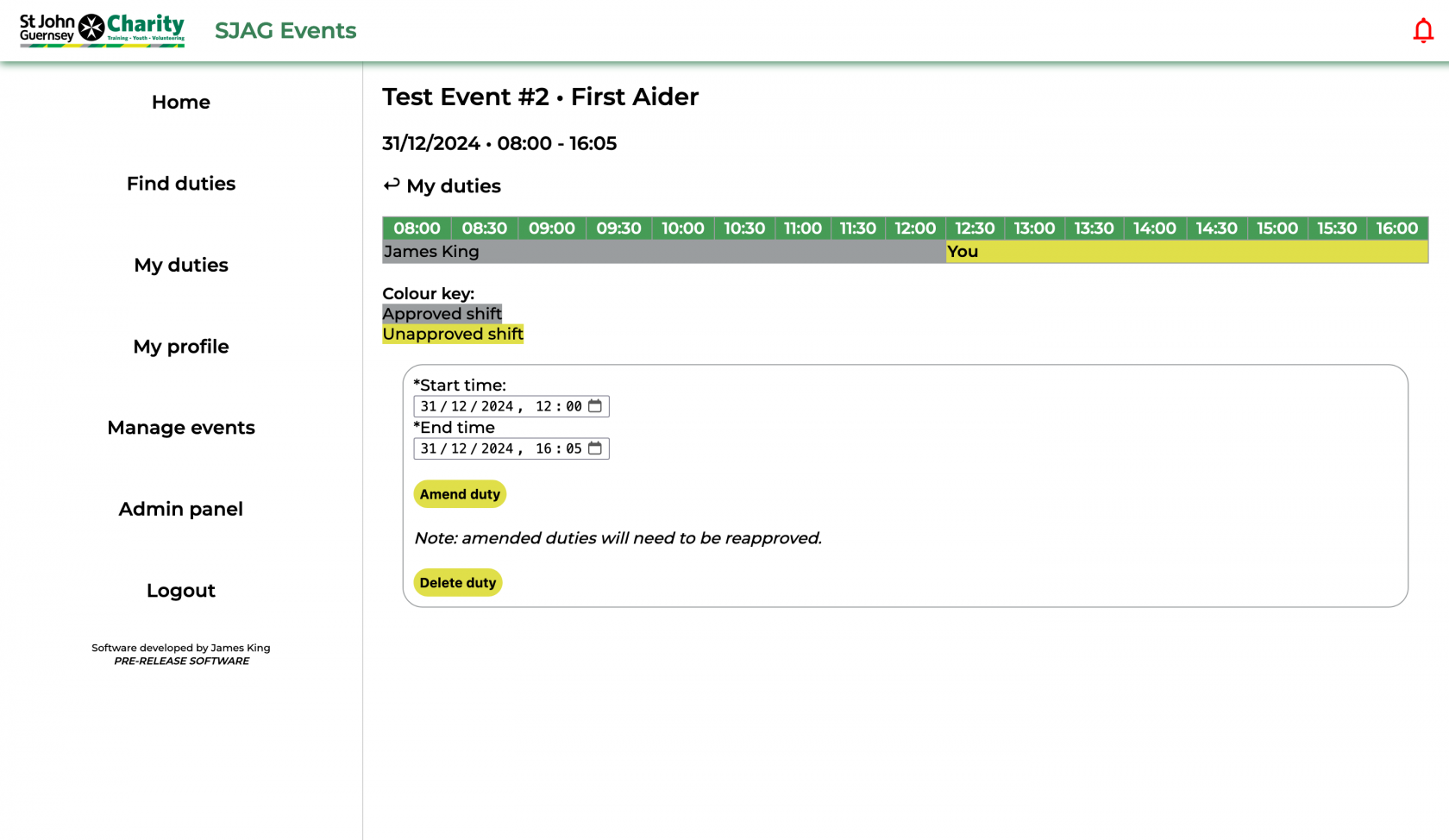](https://docs.jamesdev.co.gg/uploads/images/gallery/2024-09/edit-reqduty.png) | You can edit your duty booking's start and end times through the edit duty page. Simply adjust the times in the two field and click the 'Amend duty' button to save.
If you amend your booking after it has been approved it will need to be approved again by the event organiser.
|
# My duties
| [](https://docs.jamesdev.co.gg/uploads/images/gallery/2024-09/myduties.png) | The 'My Duties' page displays all the requirements and reserve duty bookings you have made on the system.
Duty names are colour-coded according to the type of event, using the same key as the paper duty lists: SJAG in blue, EAS in green, and joint events in red.
The 'Link SJAG Events to calendar' button will take you to the iCalendar feature page.
|
| [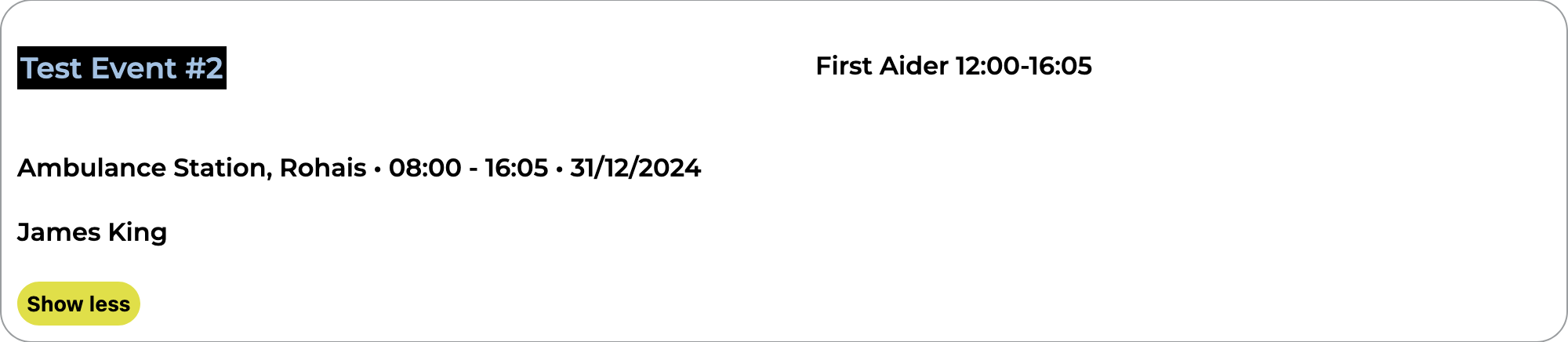](https://docs.jamesdev.co.gg/uploads/images/gallery/2024-09/myduties-bubble.png) | Each event is displayed in an "info-bubble". To prevent overcrowding, these are collapsed by default, only showing basic information. Clicking on the 'Show more' button will expand the bubble to show more information.
Clicking anywhere in the bubble will open up the event page, this contains more information on the event and is where you are able to make bookings.
Clicking on the event organiser name will open your default email app on your device, with a new email to the organiser's address.
Your booking is shown on the right side of the bubble, clicking on this will take you directly to the edit duty or edit reserve page - depending on the booking type.
|
# Book reserve duty
| [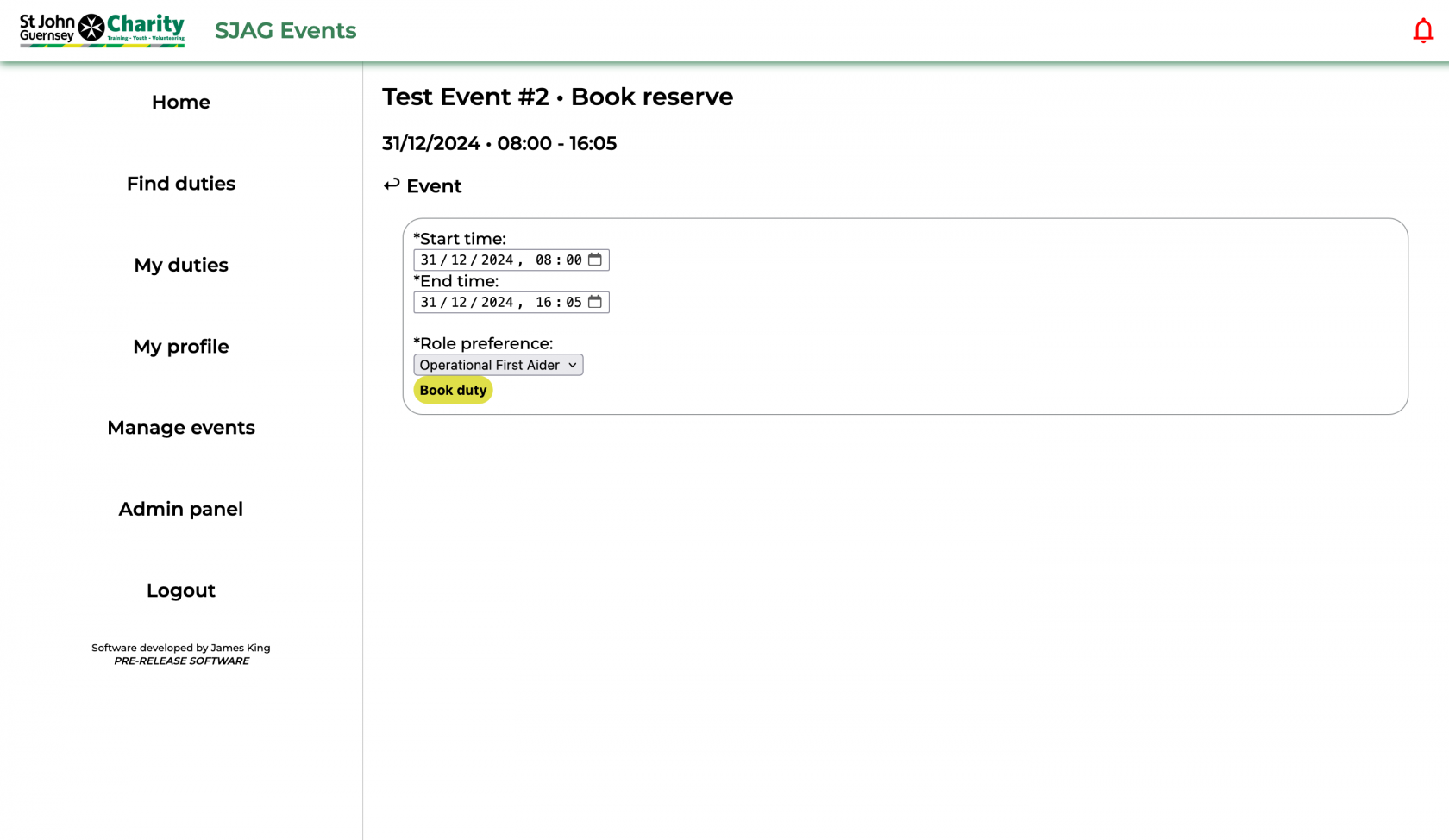](https://docs.jamesdev.co.gg/uploads/images/gallery/2024-09/book-reserve.png) | Booking a reserve duty is similar to that of booking a requirement based duty.
Fill out the form with your desired start and end time, then select which role you wish to act as from the dropdown. Then, click 'Book duty' to save.
|
# View, approve & edit reserve duty
| [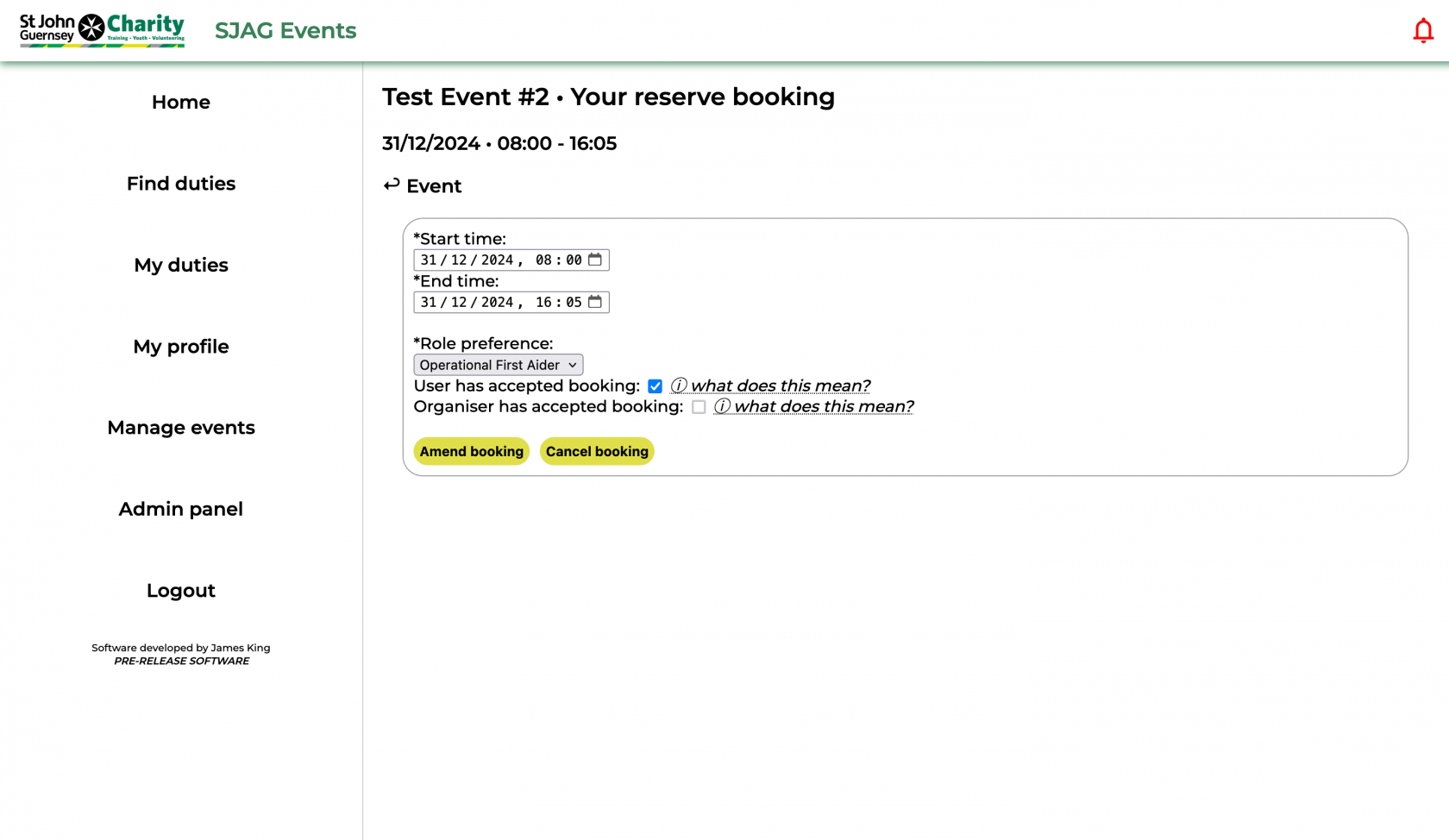](https://docs.jamesdev.co.gg/uploads/images/gallery/2024-09/edit-reserve-user.png) | Editing a reserve duty is similar to editing a requirement based duty booking.
Alter the values in the input boxes to change your start, end time, or role.
To approve a duty after an event-organiser modifies it, check the 'User has accepted booking' box.
Click 'Amend booking' to save your changes.
Alternatively, click 'Cancel booking' to cancel your duty.
**Note:** if the event organiser has already accepted your booking and you amend it, re-approval will be required.
|
# Youth Team Pages
# Cadet duties overview
| [](https://docs.jamesdev.co.gg/uploads/images/gallery/2024-10/cadet-overview.png) | The 'Cadet duties overview' allows you to quickly see all unapproved, approved, and past cadet duty bookings on the system. The yellow navigation buttons at the top of the page can be used to switch views.
Duties are shown as 'info bubbles'. Clicking on the bubble will take you to the 'Review cadet booking page'.
Use the show and hide buttons to control what information is displayed on your page.
|
# Review cadet booking
| [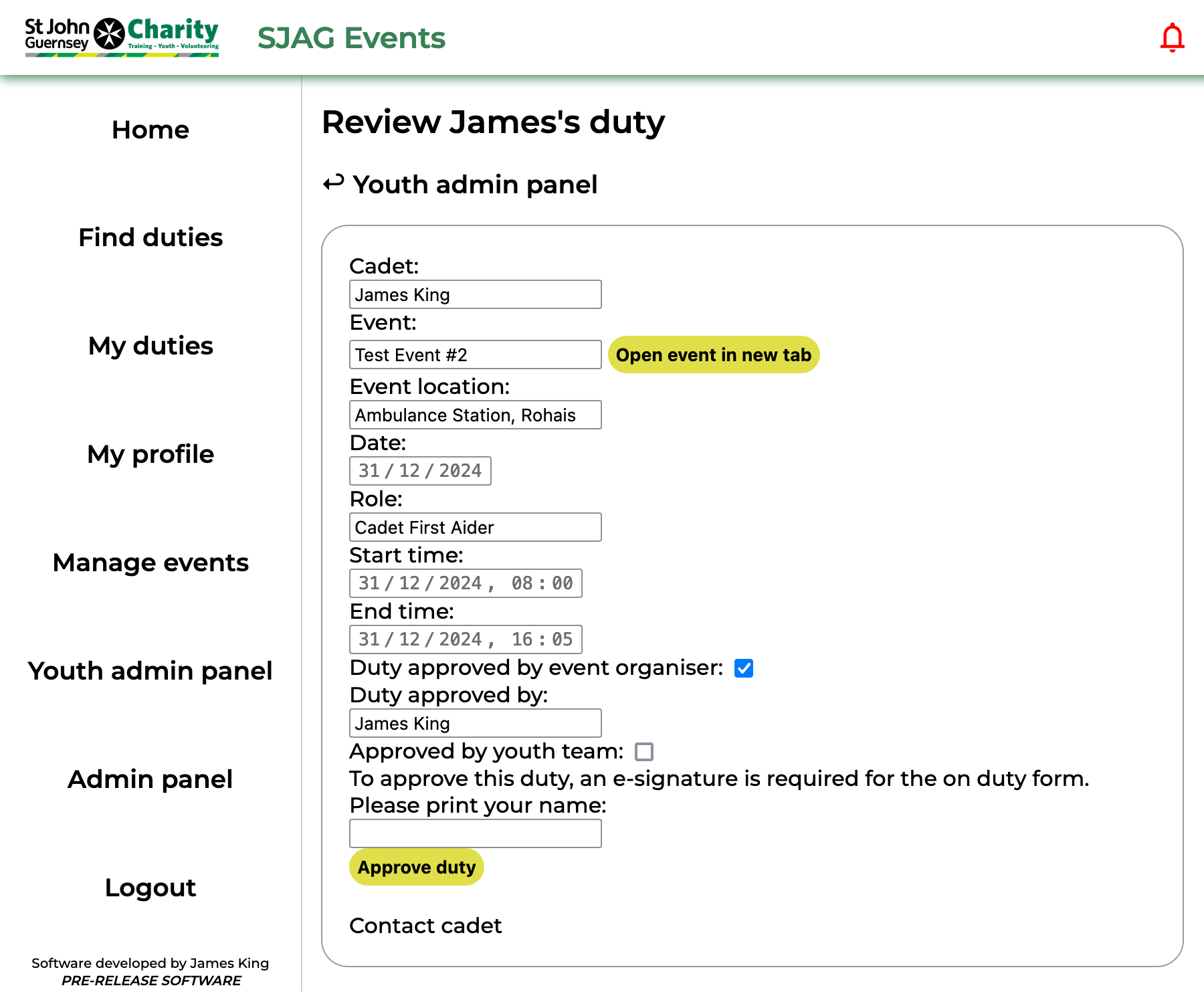](https://docs.jamesdev.co.gg/uploads/images/gallery/2024-10/cadet-review-duty.png) | The 'Review cadet booking' page serves two vital functions; to display the relevant information about a Cadet's booking, and to facilitate the youth team approval process.
The first box displays the information on the duty, including its location and date. The times of the duty and cadet role are also displayed. Clicking the 'Open event' button will display the 'Event overview' page in a new tab.
To approve the duty, enter your name into the e-signature box and click the 'Approve duty' button. This will automatically generate and send an on-duty form to the cadet, you can download a copy of this form by clicking the 'Generate form' button and downloading it to your device.
**Note:** until the duty is reviewed and approved by the youth team, event organisers are unable to accept the booking.
Clicking 'Contact cadet' will open up a new email in your deafult email application addressed to the cadet.
|
| [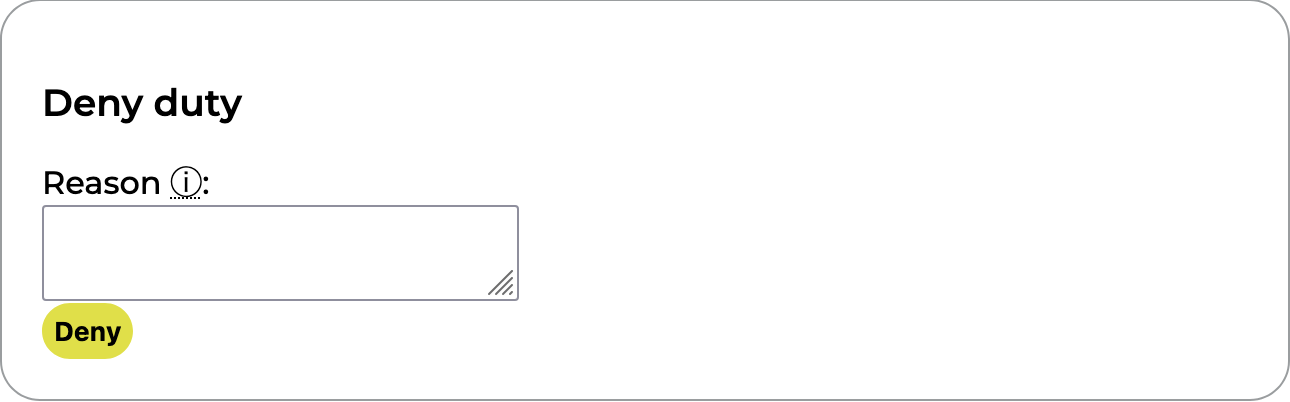](https://docs.jamesdev.co.gg/uploads/images/gallery/2024-10/cadet-review-duty-deny.png) | The second box is used for denying a Cadet's duty. This can be done at any time, even once the duty has already been approved. A text field is provided for a short message to be written, this will be included in the email sent to the cadet by the system.
|
# Cadet overview
| [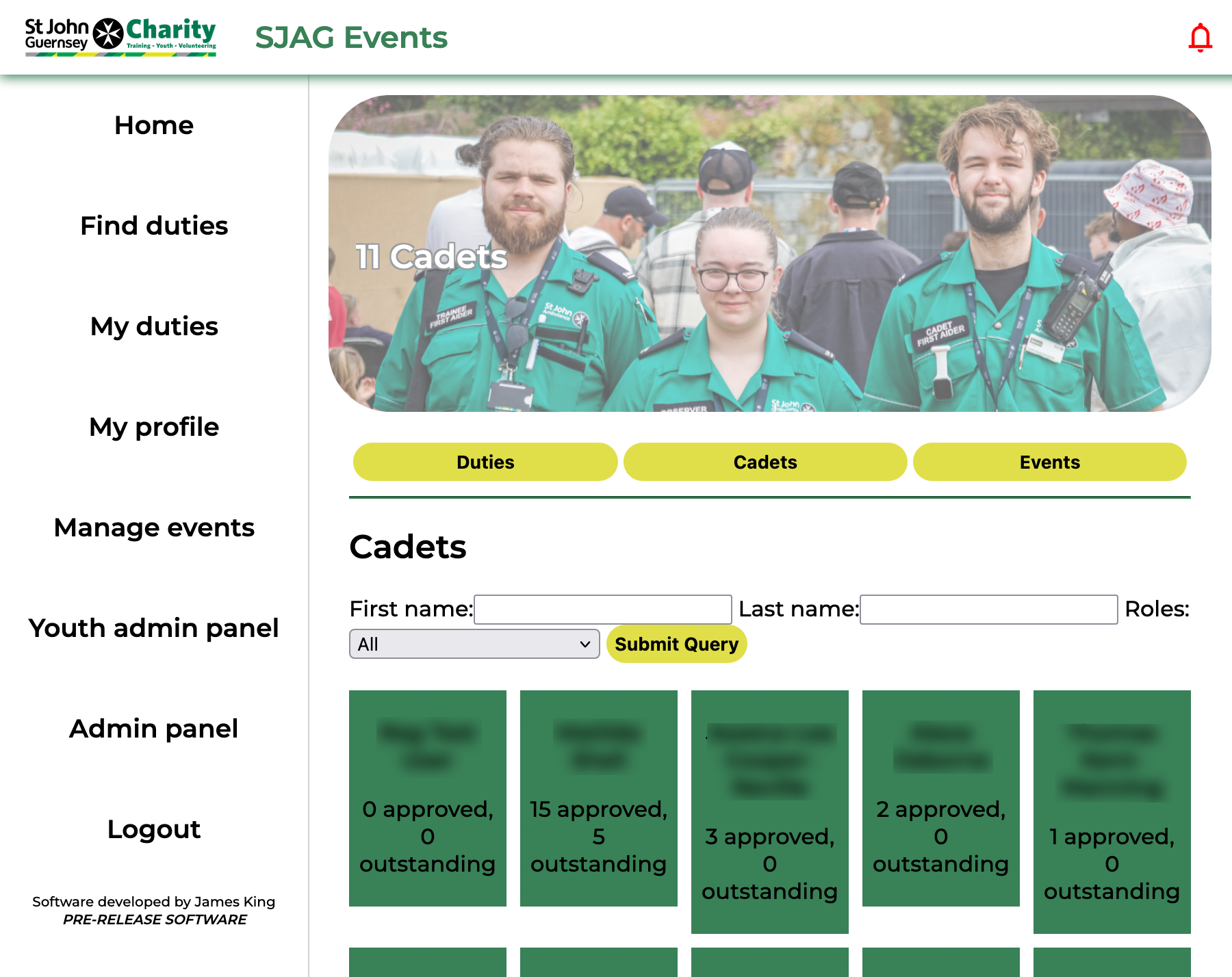](https://docs.jamesdev.co.gg/uploads/images/gallery/2024-10/cadet-overview-page.png) | The 'Cadet overview' page lists all users on the system who have a cadet role.
Use the search form at the top of the page to quicky refine your search by name or role.
Clicking on a user tile will open the 'Manage cadet' page.
|
# Manage cadet
| [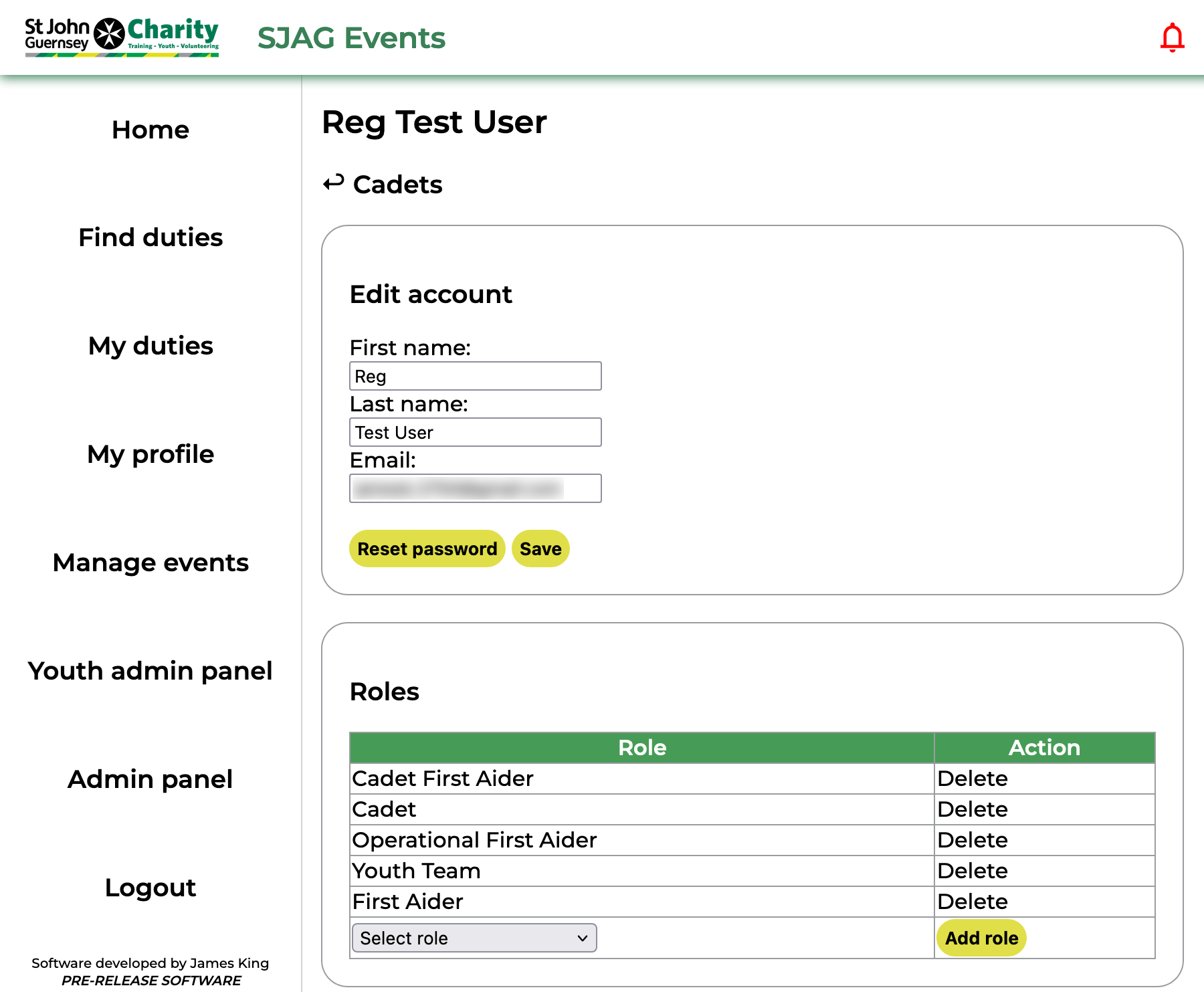](https://docs.jamesdev.co.gg/uploads/images/gallery/2024-10/ya-cadet-manage.png) | Youth admins are granted permission to alter some of the information on a cadet's SJAG Events account. This includes changing their name, email, and resetting their password. This can be done in the first box of the 'Manage cadet' page. Make sure to press the 'Save' button after making any edits to their personal details.
In the second box, youth admins are also able to remove and add cadet roles. Clicking 'Delete' next to a role in the table will remove that role from the user, selecting a role from the dropdown and clicking 'Add role' will add it.
|
| [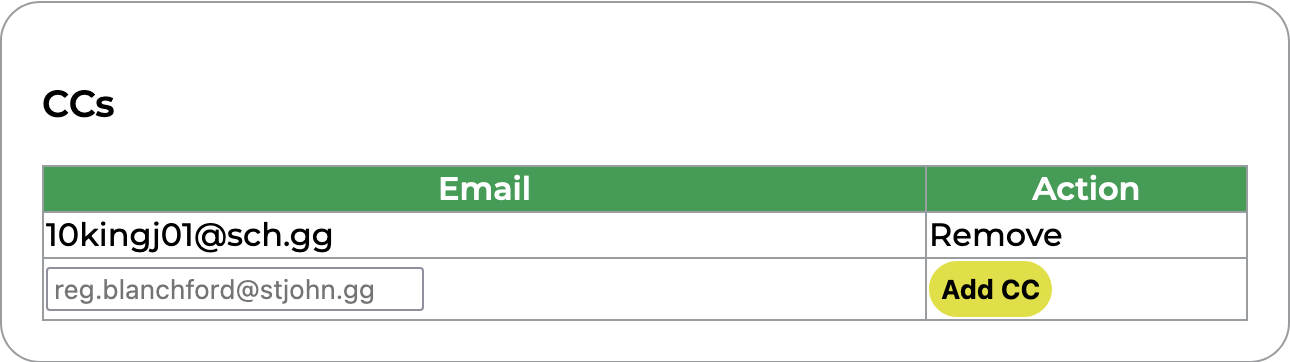](https://docs.jamesdev.co.gg/uploads/images/gallery/2024-10/ya-cadet-manage-cc.png) | CCs can be added to cadet accounts. These are additional email addresses which will be carbon-copied into all emails sent from SJAG Events to that user. However, these addresses cannot be used to access SJAG Events or will be displayed to any other users on the system. CC addresses can also be removed by clicking the 'Remove' button next to them in the table. |
| [](https://docs.jamesdev.co.gg/uploads/images/gallery/2024-10/ya-cadet-manage-duties.png) | The duties table shows all the duties the cadet has signed up for and their approval status. Clicking the 'Review' button will open the review page for that booking. |
# Cadet event overview
| [](https://docs.jamesdev.co.gg/uploads/images/gallery/2024-10/cadet-events-overview.png) | The 'Cadet event overview' page lists all events which have been marked as Cadet-friendly (as of V0.25.3). Events shown on a green tile are upcoming, while those on a grey tile have passed.
Clicking on a tile will take you to the 'Youth admin event view' page.
|
# Youth admin event view
| [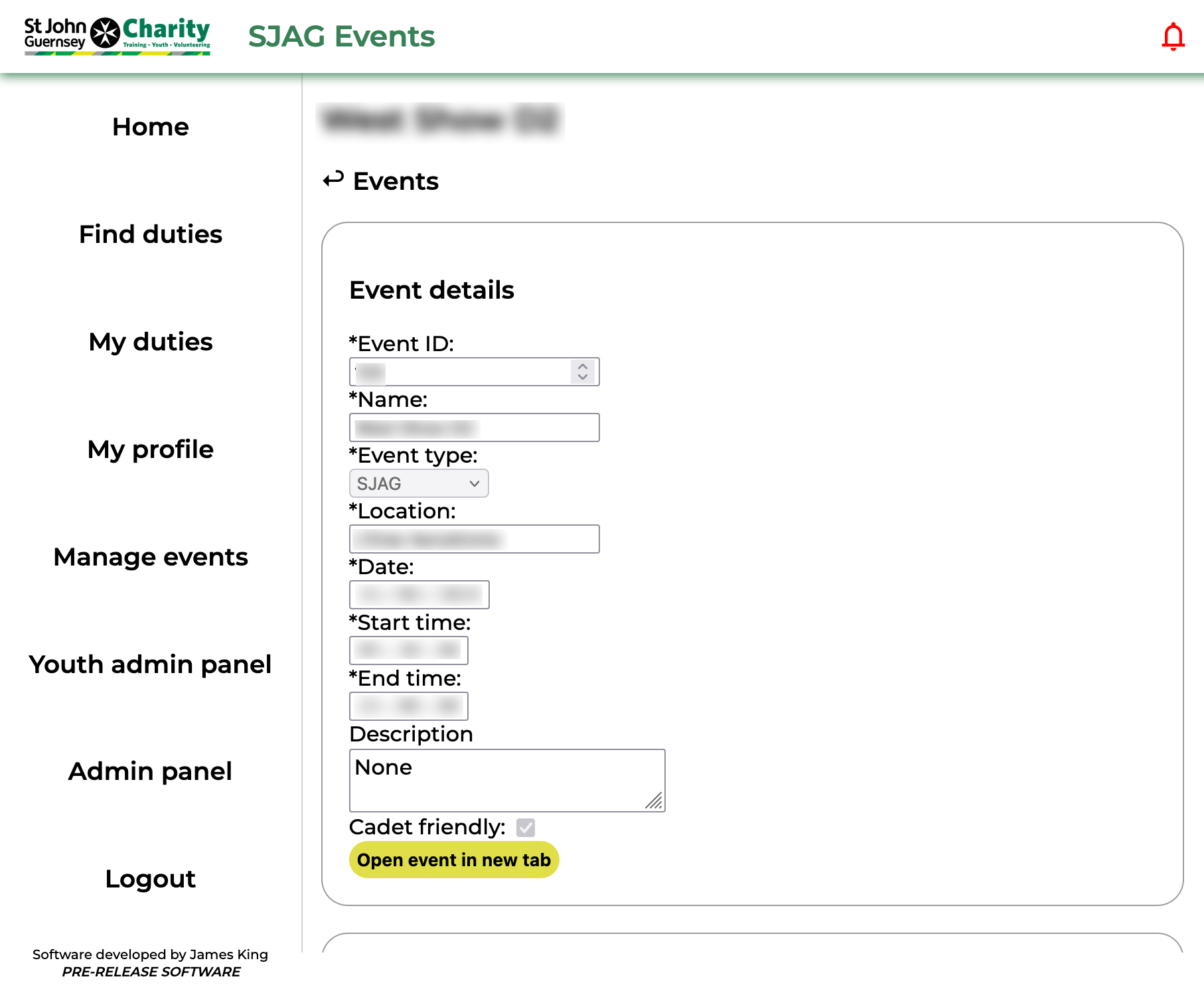](https://docs.jamesdev.co.gg/uploads/images/gallery/2024-10/ya-event.png) | The 'Youth admin event view' page shows information on an event a cadet has made a booking for. This includes the date, times, and location of the event. Clicking the 'Open event' button will launch the event overview in a new tab, where details about adult cover can be found.
|
| [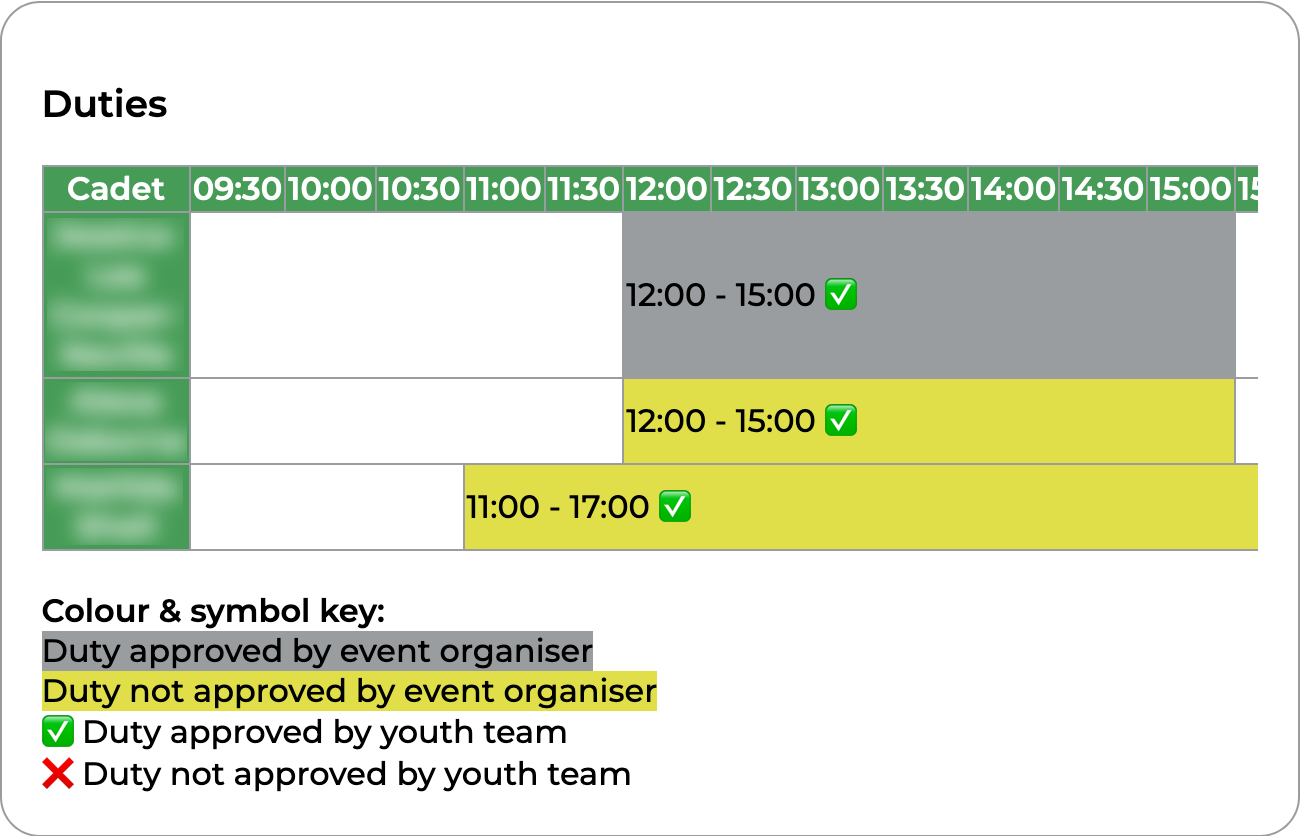](https://docs.jamesdev.co.gg/uploads/images/gallery/2024-10/ya-event-duties.png) | The duties timeline in the second box displays all the cadet duties in chronological order. Duties marked in yellow have not been approved by the event organiser, those in grey have. In addition, a tick indicates that the duty has been approved by the youth team, and a cross indicates that it has not yet been approved.
Clicking on a duty in the timeline will open the review page for that duty.
|
# Event Organiser Pages
# Adding a new event
# Updating an event
# Approving duties
# Cancelling an event
# The Event Manager Pages
Event managers are designated users on SJAG Events with the ability to create, edit, manage, and delete events. To keep the system in normal operation, these users are responsible for reviewing duties and ensuring that the data displayed on the website is accurate to what we have received from our client. The event manager pages can be accessed from the 'Manage Events' tab on the menu.
|
| **The 'Manage Events' page** is split into four separate sub-pages, navigable with the yellow buttons at the top of the page: *search, add event, bulk actions, and overview.*
|
|
| **The Search page** lists all of the events the user either is the primary event organiser off and those on which they have been added as a co-organiser.
|
|
| **The Add Event page** is used to create a new event on the system.
|
|
| **The Bulk Actions page** is a multi functional area for performing tasks on a large number of data point in SJAG Events. The user selects their desired operation (currently either add organiser, transfer, or delete events) from the drop-down yellow button and then selects the events they would like to effect by checking the boxes.
|
|
| **The Overview page** provides a more detailed view than the search page. Here, events are displayed in a print-friendly table with helpful data (such as volunteers on cover) displayed inline. The overview can also be downloaded as an excel document or PDF file for emailing and printing.
|
# Excel Tool
## **In Development**
# Admin Pages